Samples as a data modality
Studying collections of networks through their weights, structure, and predictions.
Placeholder. This note will treat collections of sampled networks as data in their own right. All values below are invented examples for figures, tables, and charts.
Math and notation
Use $...$ for inline notation such as , and
$$...$$ for display mathematics. A bmatrix environment writes a matrix:
$$
W = \begin{bmatrix}
(\theta^{(1)})^\top\\
\vdots\\
(\theta^{(S)})^\top
\end{bmatrix} \in \mathbb{R}^{S\times d}.
$$Each row is one flattened parameter vector. Comparing rows requires a consistent architecture and parameter ordering; network symmetries can make different rows represent the same function.
Figures with captions
Import a local image and wrap it in a figure. Include dimensions to reserve space while the image loads and alternative text describing its meaning.
import samplesFigure from "./samples.svg";

<figure>
  <img src={samplesFigure.src} width="720" height="280"
    loading="lazy" alt="Four sampled networks become four rows of a parameter matrix." />
  <figcaption>One row per sample, one column per parameter.</figcaption>
</figure>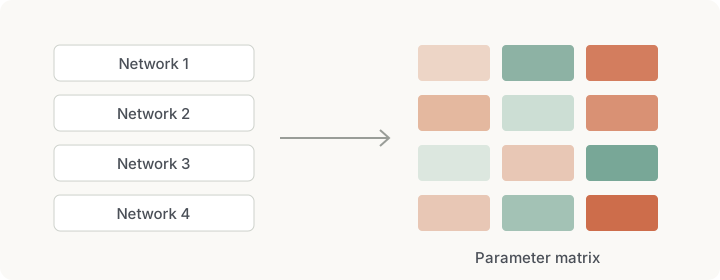
Tables
Markdown tables are useful for small amounts of data that readers may want to compare directly. Separate columns with pipes and add a header separator:
| Sample | Weight 1 | Weight 2 | Weight 3 |
| --- | --- | --- | --- |
| 1 | 0.2 | −0.5 | 0.8 |
| 2 | 0.4 | −0.2 | 0.7 || Sample | Weight 1 | Weight 2 | Weight 3 |
|---|---|---|---|
| 1 | 0.2 | −0.5 | 0.8 |
| 2 | 0.4 | −0.2 | 0.7 |
| 3 | −0.1 | 0.3 | −0.6 |
| 4 | 0.3 | −0.4 | 0.9 |
Heatmaps
The shared chart component also accepts heatmaps. Pass the matrix as z, label
both axes, and use a fixed, symmetric color scale when comparing signed values.
import PlotlyChart from "@site/components/PlotlyChart.astro";

export const samples = [[0.2, -0.5, 0.8], [0.4, -0.2, 0.7]];

<PlotlyChart data={[{
  z: samples, x: ["Weight 1", "Weight 2", "Weight 3"],
  y: ["Sample 1", "Sample 2"], type: "heatmap", zmin: -1, zmax: 1
}]}
  config={{ responsive: true, displayModeBar: false }}
  title="An illustrative sample matrix" />
Interactive chart requires JavaScript.
Hover over a cell to see its exact value. The table above provides the same data without requiring interaction.
Related work
Use Markdown links to connect notes and projects: Align posterior weights and Sample posterior weights. The other templates demonstrate function plots and sampling traces.